
LASER247 LOGIN HELP
Laser247 Login: Access Your Account
Already have a Laser247 account? Find the login screen, sign in with your username and password, and get help if you cannot log in.
Independent login guide.
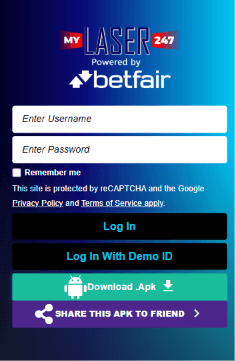
How to Log In to Laser247
01Tap Login
On the Laser247 homepage, select Login at the top right.
02Enter your details
Type your username and password. Use Remember me only on your own device.
03Select Log In
Submit your details and follow any on-screen prompts.
Laser247 Demo Login
To access the demo option, select “Log In With Demo ID” on the Laser247 login screen. Demo access is separate from your personal account.
Laser247 Login Not Working?
Incorrect username or password?
Check spelling, capital letters and extra spaces. Make sure you are signing in to the service where your account was created.
Forgot your Laser247 password?
The screen shown has no password-reset link. Contact the provider through a verified support channel. Never send anyone your password or verification codes.
Login page will not load?
Check your connection and reload. Confirm the web address before entering your details again.
Laser247 Login FAQ
Do I need to download an APK to log in?
The supplied website screenshots show a browser login option. Downloading an APK is a separate action from signing in on that website.
Can I use the same login in the app?
We have not verified that the website and APK share the same account system. Confirm this with the provider before entering your credentials.
Can Laser247-APK reset my password?
No. We are an independent information site and cannot access or recover your account.